How open world draw distance works comes down to one number: how far from your camera the engine is still willing to draw geometry before it gives up. That cutoff is the far edge of a cone of visibility called the view frustum. Everything outside it is culled away and never reaches your GPU, which is why a map spanning tens of kilometres can still run at a steady frame rate.
The catch is that the map does not shrink. Distant chunks exist, they are just too far to draw, and the engine hides the boundary with fog, haze and simplified stand-ins. Understanding that split is the difference between chasing the wrong slider and actually fixing the pop-in you can see.
Table of Contents
- What Open World Draw Distance Actually Controls
- How Open World Draw Distance Works
- Which Systems Control the Distant World?
- Why Do Distant Buildings and Roads Pop In?
- How Graphics Settings Change the Visible Horizon
- Why More Draw Distance Can Reduce Performance
- How to Choose a Draw Distance for Your PC
- Frequently Asked Questions
- Does a longer draw distance always make an open-world game look better?
- How can I tell whether pop-in is caused by draw distance or texture streaming?
- Can increasing draw distance fix stuttering in GTA V?
- Do console versions use the same draw-distance systems as the PC release?
- How much VRAM do I need for longer draw distance and high-resolution textures?
- What to Change First
What Open World Draw Distance Actually Controls
Draw distance is one setting among several that players lump together. They are not the same knob, and confusing them is the reason so many people change a slider and see nothing happen.
- Draw distance is the hard cutoff. Past it, geometry is not submitted for rendering at all.
- Fog distance decides how quickly the world fades to the sky colour before you reach that cutoff.
- Level of detail swaps detailed models for cheaper ones as they get further away, inside the visible range.
- Streaming distance governs how much of the world is loaded into memory, which is often a separate range from what is drawn.
- Simulation distance covers how far away game logic still runs for traffic, pedestrians and animals.
Those last two can extend well past what you see. A city block of traffic might be simulated two kilometres away while being invisible, which is exactly what you want in a competitive game.
How Open World Draw Distance Works
Every frame, the engine rebuilds the world around your camera. It picks sectors of the map you could plausibly see, loads what is missing, discards what is hidden, downgrades detail for anything far away, merges the survivors into a small number of draw calls, and blends the last few hundred metres into fog before the image reaches your display.
Nothing about that is a single pass. It is a pipeline, and each stage exists to hand the next one a smaller job.
How open world draw distance works across render, fog, and streaming
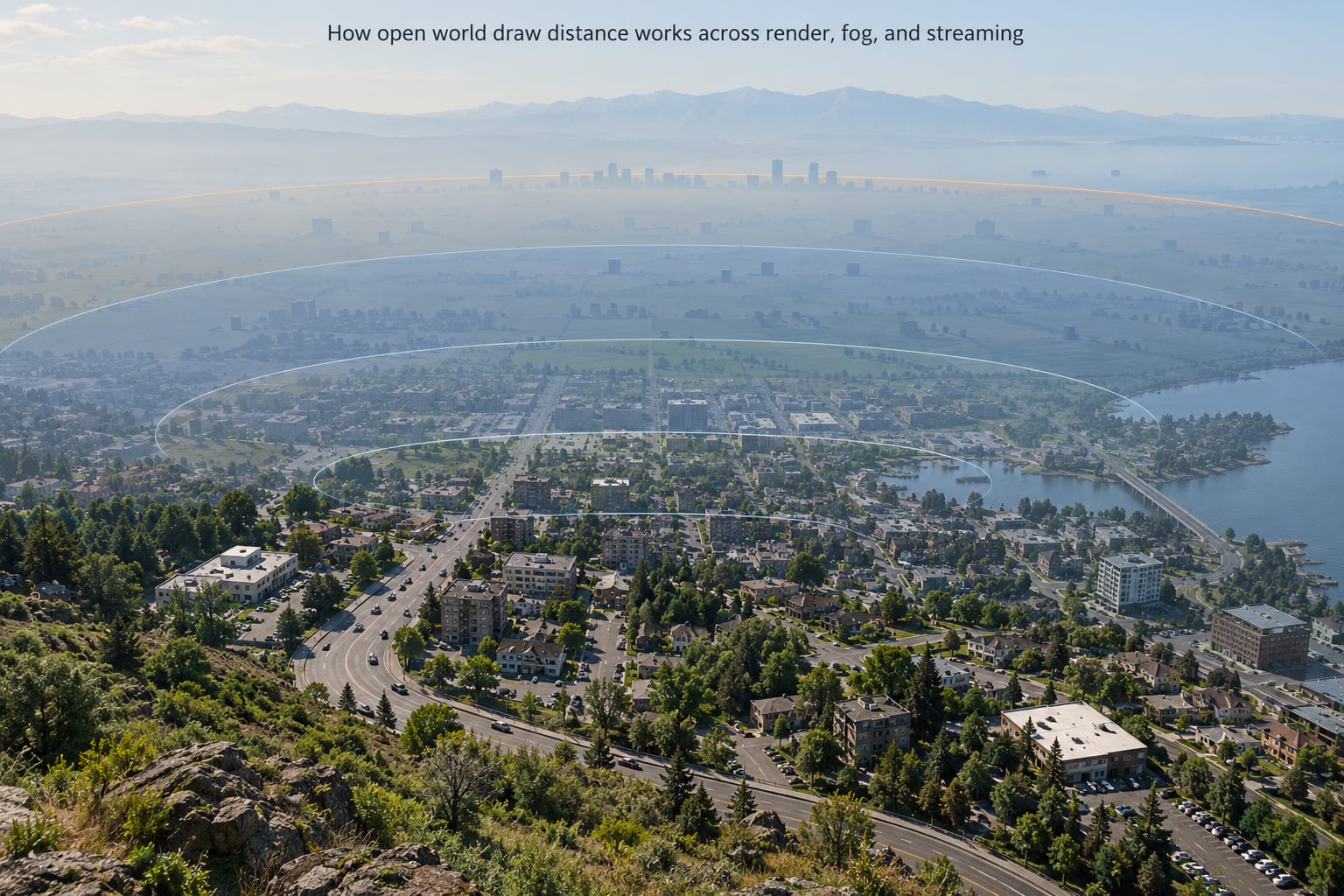
- Set the camera. The engine writes the view frustum for this frame: a near clip plane a few centimetres away and a far clip plane at your draw distance.
- Pick candidate sectors. The map is split into chunks or cells, and the ones intersecting that cone become the working set for the frame.
- Stream assets in. Missing meshes, textures and audio are read from storage. This is where hitches come from, not from the drawing itself.
- Frustum cull. Anything whose bounding volume misses the cone is dropped. On a typical open-world view this eliminates the large majority of loaded objects.
- Occlusion cull. Objects hidden behind a hill or a building are dropped too, which is a bigger win in dense towns than in open countryside.
- Substitute detail. Near meshes are drawn in full. Mid-range objects drop to lower-detail levels, and the farthest ones become impostors: a single textured cutout that looks like the real object from a distance.
- Batch and submit. Objects sharing a material get combined, often through GPU instancing, so thousands of items cost a handful of draw calls instead of thousands.
- Fog and present. Atmospheric blending fades the outer ring into the sky, and the finished frame goes to your monitor.
Steps three and four are the ones players confuse most. One of them loads the world; the other throws it away. A machine with a fast CPU and fast storage can stream aggressively and still cull just as hard.
Which Systems Control the Distant World?
Each system below produces a different symptom. Matching the symptom to the system is much faster than toggling settings at random.
| System | What it does | What you see when it is limiting |
|---|---|---|
| Render / draw distance | Sets the far clip plane for geometry | A hard edge where terrain stops, or distant objects appearing from nothing |
| Frustum culling | Drops objects outside the camera cone | No visible effect, since it is already free |
| Occlusion culling | Drops objects hidden behind other geometry | Objects behind hills fail to appear in time when the system is disabled |
| Level of detail | Swaps in cheaper meshes with distance | Visible texture or shape pop mid-view, sometimes a silhouette jump |
| Impostors | Replaces distant objects with a flat cutout | Flat-looking scenery on the horizon that resolves as you approach |
| Object streaming | Loads and unloads world assets from storage | Stutter, hitching and brief freezes while driving fast |
| Fog and haze | Blends the outer edge into the sky | Heavy haze starting surprisingly close, or a visible edge if fog is disabled |
| Shadow distance | Limits how far shadows are cast | Shadows ending abruptly in the middle of open ground |
| Draw-call batching | Merges objects into few GPU submissions | A CPU-bound frame rate that barely moves when you lower graphics quality |
Two of these are worth separating in your head. Render distance decides what you see. Streaming distance decides what is ready to be seen. A game can stream four kilometres of city while only drawing one, and that is normal, healthy behaviour.
Why Do Distant Buildings and Roads Pop In?
Pop-in happens when an object crosses a distance threshold and the engine switches strategy before the change is visible. Roads pop because the road surface and its markings swap to a coarser mesh at one threshold, while the buildings beside it keep their detail until a later one.
Thin geometry is the worst offender. A fence, a railing or a lamp post occupies very few pixels on screen, so an engine judging detail by screen-space size will downgrade it far earlier than a warehouse covering the same distance. This is why players report fences and thin objects disappearing at range even with view distance maxed out, and why grass often has its own separate distance value that does not move when you change the main slider.
Textures have their own version of the same idea. Mipmapping swaps in progressively blurrier texture levels, and a coarse mip arriving late is the difference between a wall looking like brickwork and a wall looking like a grey block for a second.
Then there is the case nobody expects: a patch that quietly reduces your effective distance. Dying Light’s 1.2.1 update is the widely reported example, where the view distance setting ended up delivering roughly half its previous reach with no warning in the menu. If your horizon shrank without you touching anything, the change came from outside your settings file.
Pop-out, the mirror image, happens when an object vanishes as you move away. That is usually LOD logic doing its job a moment earlier than your eye expects, and it is the cheaper of the two artifacts to live with.
How Graphics Settings Change the Visible Horizon
Draw distance is the slider that moves the horizon directly. The rest change what the horizon looks like once it is there.
- Texture quality affects memory and the rate that sharp mip levels arrive, not how far you can see.
- Shader quality changes how lighting and surface detail are computed for everything still drawn.
- Shadow distance is the second most visible range setting, because shadows ending in the middle of a field reads as a bug.
- Grass and foliage density controls vegetation range, which often has its own limit independent of the main distance slider.
- Population density sets how far traffic, pedestrians and animals are simulated and drawn.
Menu paths differ across the older PC releases. GTA III, San Andreas and Vice City expose distance through directX settings in the graphics menu, where a custom mode is required before the sliders appear. GTA IV keeps its core panel in Settings > Graphics and pushes the rest into Advanced or DirectX options. GTA V spreads them across Settings > Graphics > Advanced Settings, with a separate Extended Distance setting for the city mesh, the shadow map distance and the water grids appearing under the quality presets.
Two GTA V details catch people out. The Extended Distance slider is a preset that scales several distances at once, not a single continuous control, and the water grid quality is capped well below Ultra on many cards. Older titles also cap harder, since their engines were built against texture memory limits that no longer apply to current hardware.
Why More Draw Distance Can Reduce Performance
Raising the distance is not one cost. It is at least four, and they hit different hardware, which is why the same change can be free on one machine and brutal on another.
- Triangles and vertices. More of the world survives culling and LOD, so the vertex stage has more to transform.
- Draw calls. Far more objects means more GPU submissions. This is the cost that punishes weaker CPUs first.
- VRAM. Loaded meshes and their textures compete for video memory, and running out causes stutter rather than a lower frame rate.
- Fill rate. Distant scenery covers a lot of screen area, and fog and volumetrics do not get cheaper when there is more of it.
| Change | Typical effect | Who notices most |
|---|---|---|
| Raise draw distance | Noticeable frame-time increase, more VRAM | Mid-range GPUs, older CPUs |
| Raise shadow distance | Large cost, often larger than draw distance itself | Everyone; usually the first thing to trim |
| Raise grass and foliage distance | Heavy vertex cost with small visual payoff at range | CPU-bound systems |
| Lower shadow quality, keep draw distance | Recovers most of the frame rate lost to distance | The best trade available in most open worlds |
| Lower texture quality | Modest gain, visible up close | Low VRAM cards |
| Lower population density | Simultaneous AI and draw-call relief | Cities and highways |
The row worth remembering is the fourth. Long sightlines and soft shadows rarely cost the same amount, and players are usually happier with a distant mountain range at low shadow quality than with crisp shadows that stop two hundred metres out.
How to Choose a Draw Distance for Your PC
Work in measured steps rather than dragging the slider to maximum and hoping.
- Find your baseline. Pick one familiar route, drive or fly it, and note the average frame rate and the 1% low. The low figure matters more than the average, because stutter is what players actually notice.
- Increase in steps. Move the distance a quarter of the slider at a time and re-run the same route. Note both numbers each time.
- Watch consistency, not peak. A distance that holds 60 most of the time and dips hard at a city junction is worse than one step lower that holds steady.
- Test the worst case, not the highway. A flyover looks cheap. A dense downtown at noon is where draw calls and AI collide.
- Do not spend the savings on things only you can see. If you are playing a story game at night, extra grass detail is worth less than the frame rate it costs.
- Stop when stutter outweighs the view. The point is a believable world at a smooth frame rate, not the biggest number on the menu.
On console you have far less room. Distance and quality are tied to the platform preset, and the frame-rate target is fixed at 30 or 60. Shorten the range by editing the configuration file on PC instead, and leave console settings alone unless you know the exact key.
If you want to look at how this shows up in practice, our graphics and preset guides cover per-game menu paths, and the maps and worlds section explains what changes when a world is rebuilt from streamed chunks.
Frequently Asked Questions
Does a longer draw distance always make an open-world game look better?
No. A longer view helps most in open countryside, where the horizon is the whole point. In dense cities it adds objects you rarely look at, costs draw calls and VRAM, and often buys you stutter instead of scenery. Some players also argue the opposite case, preferring soft shadows and a stable frame rate over a longer view. The honest answer is that it depends on where you spend your time and what your hardware can hold steady.
How can I tell whether pop-in is caused by draw distance or texture streaming?
Look at what appears. If a whole object or patch of road arrives at once, that is geometry streaming or a level-of-detail swap. If a surface is already there but flat and blocky for a moment before sharpening, that is a texture mip arriving late, which is a streaming problem. Raising draw distance fixes the first and barely touches the second. Faster storage and higher texture quality help the second.
Can increasing draw distance fix stuttering in GTA V?
Rarely. Stutter in that game usually comes from asset streaming and shader compilation, not from drawing distance itself. A longer draw distance can make it worse by loading more of the city, which means more streaming work. If you want to test it, raise Extended Distance one step and drive the same route. If the 1% low gets worse, drop it back and look at shadow quality, population density and your frame rate cap instead.
Do console versions use the same draw-distance systems as the PC release?
The underlying systems are the same. Console builds still use culling, level of detail, impostors and fog, and they use the same shaders. The difference is control. Distances are tied to a quality preset chosen by the platform, config editing is far more limited, and the frame rate target is fixed. That means a console build is usually more conservative about draw distance so it can hold its target consistently.
How much VRAM do I need for longer draw distance and high-resolution textures?
A rough guide is 6 GB for a comfortable 1080p experience with extended draw distance on a modern open world, 8 GB for high textures at 1440p, and 12 GB or more if you want 4K with everything raised. Draw distance consumes VRAM mainly through loaded textures for a larger area, so pushing it on an 8 GB card can exhaust memory and cause stutter even when the frame rate looks fine.
What to Change First
Confirm you are GPU-bound before you touch anything. If lowering texture and shader quality barely moves the frame rate, your limit is elsewhere, and a longer draw distance will only make it worse.
Then raise draw distance before the expensive effects, and pay for it by dropping shadow quality first, population density second. Upgrade textures or system memory only when your own testing shows that specific step is the one that matters. Stop increasing the moment stutter costs more than the extra horizon is worth, and keep the view you can hold steady.
This guide was checked against current engine behaviour in 2026, and the underlying pipeline has not changed much since the early days of 3D accelerators.