Script Hook explained for beginners comes down to one idea: Script Hook V is a small library that lets GTA V mods and scripts talk to the game. It is not a mod itself, it adds no cars or weapons on its own, and installing it changes nothing on screen until a mod that needs it is also installed.
Most beginners arrive here after a video told them to install it, so they do, and then nothing happens. That confusion has a simple cause: Script Hook V is the plug, not the device. This guide covers the PC version most people mean, the one built for GTA V, and walks through what it does, which of the similarly named tools they actually want, how to install it, and how to fix the two errors that hit almost everyone.
If you only take three things from this page, take these. Script Hook V goes in the same folder as GTA5.exe. Only dev-c.com is the safe download. And it stops working every time Rockstar ships a patch, which is normal and temporary.
Table of Contents
- 1What Is Script Hook?
- 2What Does Script Hook Do in GTA?
- 3Which Type of Script Hook Do You Need?
- 4What You Need Before Installing Script Hook
- 5How to Install Script Hook V for GTA V
- 61. Find the folder that contains GTA5.exe
- 72. Stop the game and the launcher
- 83. Back up what is already there
- 94. Copy the files from the download
- 105. Keep the bundled folders intact
- 116. Test in Story Mode
- 12How to Tell Whether Script Hook Is Working
- 13Open the included Native Trainer
- 14Read the screen for a missing mod
- 15Check the version against your game build
- 16Common Script Hook Installation Problems
- 17The rename test that settles most cases
- 18How long the fix takes after a patch
- 19Should you downgrade the game instead?
- 20How to Keep Script Hook and GTA Mods Compatible
- 21Add one mod at a time
- 22Treat a Rockstar patch as a maintenance day
- 23Check the modder’s stated requirements
- 24Never run two loaders at once
- 25Keep a clean folder copy
- 26On downloads and safety
- 27Frequently Asked Questions
- 28What is Script Hook V in simple terms?
- 29How do I install Script Hook V on GTA V?
- 30How do I open Script Hook V in GTA 5?
- 31How do I fix the Script Hook V Critical Error?
- 32Why does Script Hook V stop working after every GTA 5 update?
- 33Are GTA V mods legal and safe to use?
- 34Conclusion: Start With a Clean, Compatible Setup
What Is Script Hook?
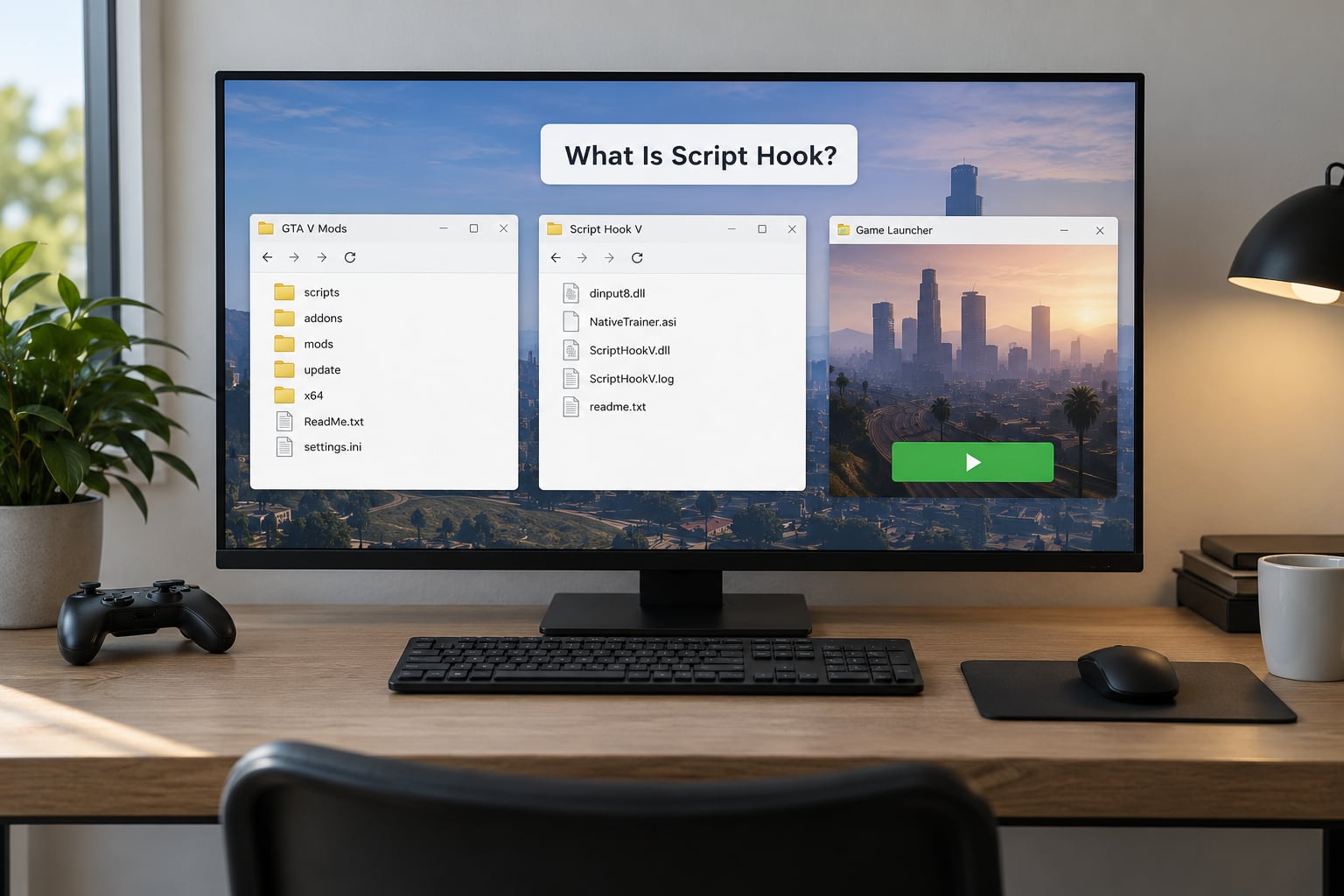
Script Hook V is a free modding library for Grand Theft Auto V on PC. It lets custom .asi plugins and scripts call the game’s internal functions. Without it, most single-player mods, trainers and script tools for GTA V simply will not load, and the game runs as normal.
That last sentence is the part beginners miss. Installing Script Hook V on a clean copy of the game changes nothing you can see. There is no menu, no new icon, no new file on the desktop. It sits in the background waiting for another mod to use it.
A useful analogy: think of it as the USB controller rather than the device plugged into it. The controller has no features of its own, it just makes the connection possible. When people ask whether Script Hook is safe, they are usually really asking whether the file sitting in their game folder is the real one.
It is worth separating three things that get bundled together in most conversations: the game itself, your legitimate copy of it, and the modding tools on top. Script Hook V belongs to the third group.
What Does Script Hook Do in GTA?
Here is the mechanism, stripped back. GTA V mods are small programs, usually with an .asi extension, that want to change how the game behaves. Each one needs a way to reach the game’s own functions. Script Hook V provides that way by shipping a file called ScriptHookV.dll, which sits next to the game executable.
The loader piece matters too. Alongside ScriptHookV.dll you get an ASI loader, normally named dinput8.dll. When the game starts, that loader scans the folder for .asi files and loads each one. Script Hook V then gives those loaded files their route into the game.
So the sequence looks like this: you start the game, dinput8.dll loads, your .asi mods get pulled in, and ScriptHookV.dll lets each one act. Remove Script Hook V and the chain breaks, even though the loader and the mod are both still on disk. That is why deleting one file can disable an entire mod setup.
The design has one very practical consequence for beginners. Because plugins depend on ScriptHookV.dll rather than on the whole game, a new Rockstar patch only breaks that single file. When a fresh version is released, you replace one DLL and your setup comes back, provided the mods themselves have been updated too.
What it does not do: add content, improve graphics, unlock anything in GTA Online, or work with console versions of the game. It is also not required to play the game. A completely unmodded GTA V does not want it in its folder.
Which Type of Script Hook Do You Need?
Several tools have Script Hook in the name, and they are not interchangeable. Identify your game, then identify which mod you want to run, before you download anything. That two-minute step saves most of the confusion in this whole area.
| Tool | What it does | Do you need it? | Needs Script Hook V? |
|---|---|---|---|
| Script Hook V | Bridges GTA V script natives to .asi plugins | Yes, for most single-player mods and the included Native Trainer | It is the base layer |
| ScriptHookVDotNet | .NET scripting layer so scripter-made mods can run | Only if the mod page lists it as a requirement | Yes |
| Asi Loader | Scans the folder and loads .asi files | Usually arrives bundled with Script Hook V | Yes |
| OpenIV | Edits and replaces game files inside the game folder | For file replacement mods only | No |
| CodeWalker | Reads and edits game assets and models | For vehicle and map authors | No |
| LSPDFR | Large police and emergency-response framework | When you want a full overhaul rather than single tweaks | Yes |
| Script Hook RDR2 | The same idea, built for Red Dead Redemption 2 | Only for RDR2 mods | Separate product |
GTA V ships in more than one edition, and the edition decides which build you need. If you see an Enhanced edition and a Legacy edition on the store page, check which one you own, because the wrong pairing produces errors that look like corruption. The version number listed on the official page tells you which game builds it currently supports.
A note on naming: Script Hook V is for GTA V only. If your mod page talks about Rockstar Redemption or a different game entirely, this guide is not the one you want.
What You Need Before Installing Script Hook
Six things, and none of them are complicated.
- A PC copy of GTA V, launched from the Rockstar Games Launcher, Epic Games Store or Steam, with the game fully updated.
- Administrator access to your Windows account, because the files go into a protected folder.
- The exact Script Hook release that supports your current game build, taken from the official page.
- A clean mod source, meaning a download you trust and a mod whose requirements you have actually read.
- A backup of your game folder, or at least of your scripts and mods folders, before you touch anything.
- About twenty minutes and the willingness to stop after one test mod works.
The backup deserves its own line. Copy your scripts and mods folders to a separate folder on another drive or in your documents, not inside the game folder. When a patch wipes a setup, that copy is the difference between a five-minute restore and rebuilding everything from memory.
Read the mod page before you download anything, not after. It will tell you the required Script Hook version, the minimum game build, and often whether ScriptHookVDotNet is needed as well. Installing the wrong combination is the root cause of most failed setups I would otherwise have to troubleshoot.
How to Install Script Hook V for GTA V
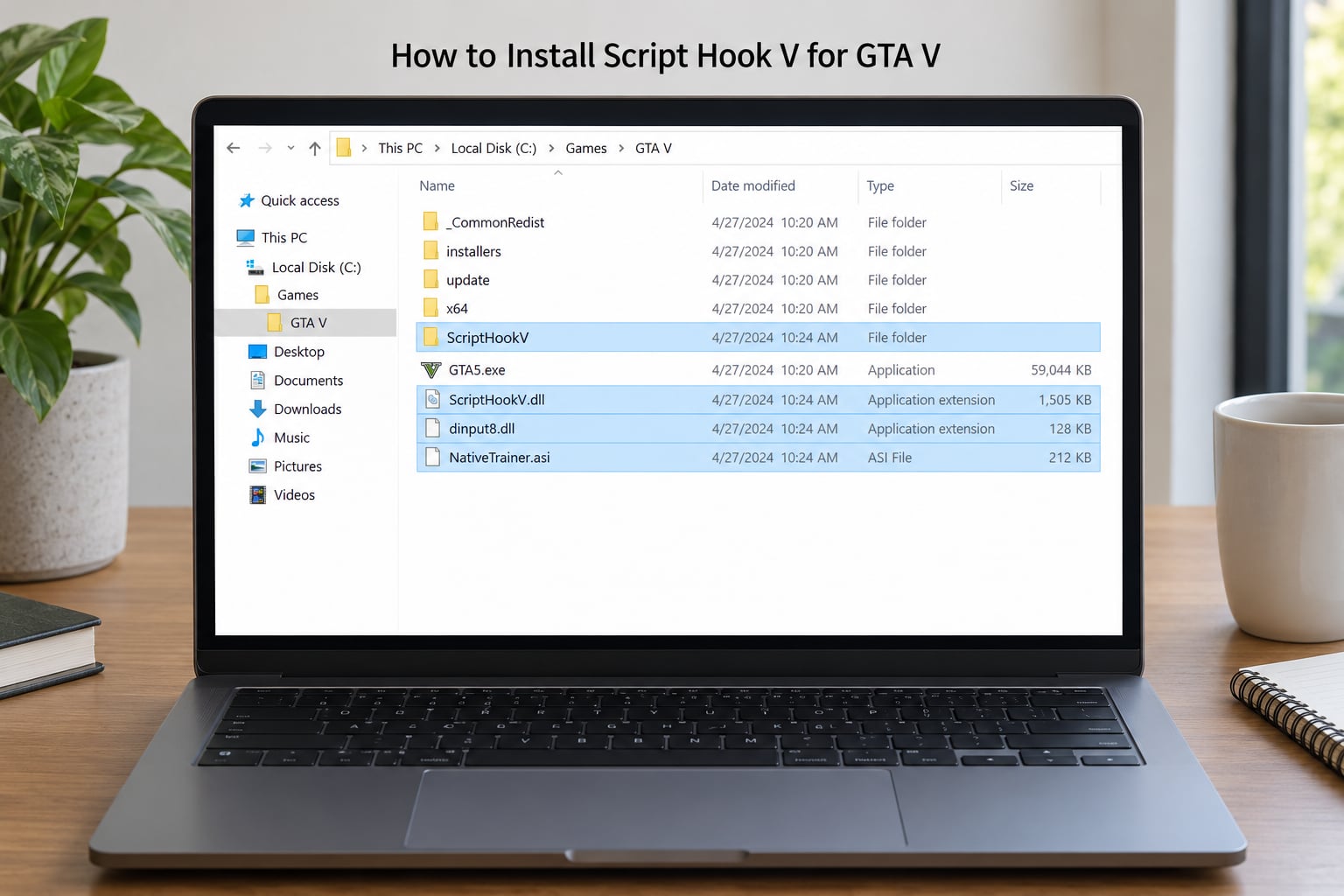
Find the folder first, then copy two things into it. The whole procedure takes a few minutes, and almost every failure happens at step two, when the files land one level too high or too low.
1. Find the folder that contains GTA5.exe
Open the launcher you own, find your GTA V library, and use the install or browse files option. The folder you want is the one with gta5.exe sitting directly inside it. Not the parent folder, not a Rockstar Games folder above it. If a mod page or OpenIV tells you the folder does not contain gta5.exe, you are one level away from the right spot.
Typical locations: Steam keeps it under steamappscommonGrand Theft Auto V. Epic Games and the Rockstar Games Launcher use their own library folders, which is why files copied to a guessed Steam path seem to do nothing.
2. Stop the game and the launcher
Close GTA V if it is open, and exit the Social Club client or the Rockstar Games Launcher from the system tray. Right-click the tray icon and choose exit. A locked file will silently fail to copy, which looks exactly like a bad download.
3. Back up what is already there
If a previous version exists, copy your current scripts folder, mods folder and the existing DLLs somewhere safe. If an older installer left a dsound.dll behind, note it now. The official instructions call for removing leftover loader files from previous setups, and knowing what you had makes that cleanup obvious.
4. Copy the files from the download
Open the archive you downloaded. You should see dinput8.dll, ScriptHookV.dll, NativeTrainer.asi and usually a NativeTrainer folder, plus notes and an optional SDK archive. Select all of them, copy, and paste them directly into the folder containing gta5.exe.
If Windows asks about replacing an existing file, confirm it. You want the new version, not the stale one.
5. Keep the bundled folders intact
Do not flatten or rename anything inside the NativeTrainer folder if it came as a folder. The trainer expects its files in that layout, and a corrupted trainer file shows up as a trainer that never opens rather than an error message.
6. Test in Story Mode
Start the game through your normal launcher, load into Story Mode, and give it a few seconds. There is no installer wizard and no confirmation dialog. If the game boots and the trainer responds, the installation worked.
If the game refuses to start at all, go straight to the troubleshooting section and start with the rename test. It is the fastest way to isolate the cause.
How to Tell Whether Script Hook Is Working
There is no Script Hook menu to look for, which is why beginners ask how to open it. You confirm it by triggering something that only works when it is loaded.
Open the included Native Trainer
Load into Story Mode and press the numpad 8 key, written as Num 8. A trainer overlay appears. If it does, Script Hook V is loaded, the ASI loader is working, and your file placement is correct.
A real caveat here. Many laptops, compact keyboards and some external keyboards have no numpad, so Num 8 has no key to press and nothing appears. That is a hardware limit, not a broken install. External numpads are cheap and work. Some trainers can also be bound to another key from their own settings file, which is worth trying before buying anything.
Read the screen for a missing mod
Beyond the trainer, any mod with a visible effect is a valid test. A vehicle that spawns where it did not before, a different weather setting, a HUD element that was not there last session. If a mod you know is compatible produces nothing, work through the checks below rather than reinstalling blindly.
Check the version against your game build
The official page lists the Script Hook version and the game build numbers it supports, with a release date. Last verified for this guide in 2026: version v3889.0 / 1158.13, supporting patches 1.0.3889.0 / 1.0.1158.13, released in July of that year. If your build number is higher than the supported one, waiting is the correct move, not tinkering.
One more detail worth knowing: if you enter GTA Online, Script Hook V closes the game by design. That is not a crash and not a bug. It is the boundary that keeps your mods out of a competitive, account-linked environment.
Common Script Hook Installation Problems
Nearly every problem a beginner hits falls into one of these rows. Find your symptom, then work down the fix column in order.
| Symptom | Cause | Fix |
|---|---|---|
| Unknown Game Version error | Rockstar patched the game after the Script Hook release | Compare your build with the supported build on the official page and wait for a matching release |
| Script Hook V Critical Error on launch | Version mismatch, or an old mod in the scripts folder | Install the current release, then empty the scripts folder and add your mods back one at a time |
| Game will not launch at all | An .asi file that cannot load | Rename dinput8.dll, see if the game boots, then restore it after installing the matching version |
| Trainer will not open | No numpad, or a corrupted NativeTrainer file | Use a keyboard with a numpad or an external one, and reinstall the bundle rather than reusing an old trainer file |
| Antivirus removed the DLL | False positive on an unsigned injector-style file | Check quarantine, restore from the official download, and add an exclusion for the game folder if it keeps happening |
| Everything works until an update | Patch changed the build number | Expected. Wait for the new Script Hook release and reinstall the one DLL |
| Mods do nothing but the game runs fine | Files in the wrong folder, or wrong edition of the game | Confirm gta5.exe sits in the folder you pasted into and that the mod targets your edition |
| Mod stopped working after a modder update | An outdated mod file left in the scripts folder | Bisect: clear the scripts folder, then the mods folder, and rebuild one mod at a time |
The rename test that settles most cases
If the game will not start, rename dinput8.dll to something else and try again. If the game boots, the loader is the problem and you have a version mismatch. If it still fails, the cause is elsewhere, usually a mod file rather than Script Hook V itself. Rename it back once you install the release that matches your build.
How long the fix takes after a patch
Realistically, a few days to a couple of weeks. The developer has to work against the new build before the update lands, so there is a gap every time. Forum threads from previous patches go stale fast, which is why this guide states the verified version and date rather than pointing you at an old answer.
Should you downgrade the game instead?
Some players hold an older build so their setup keeps working. It works, but it costs you online access and every future update becomes a chore. Waiting a week is the calmer path for most people.
How to Keep Script Hook and GTA Mods Compatible
Mod setups fail quietly, then all at once. A short routine prevents most of it.
Add one mod at a time
Install a mod, launch, confirm the change, then move on. Batches of five are how setups become impossible to diagnose, because you have no idea which one broke it.
Treat a Rockstar patch as a maintenance day
Back up scripts and mods to a folder outside the game directory before you let the game update. Once the new Script Hook release matches the new build, restore your mods and add them back one at a time.
Check the modder’s stated requirements
Minimum game build, required Script Hook version, whether ScriptHookVDotNet is needed. These lines are on every serious mod page and are the fastest answer to most failures.
Never run two loaders at once
Two ASI loaders competing over the same .asi files cause crashes that look like anything else. One loader, sourced from the official Script Hook download.
Keep a clean folder copy
An untouched copy of your game folder, before mods, is the fastest rollback you will ever have. It also lets you confirm whether a problem is your mod setup or something else entirely.
On downloads and safety
Script Hook V is free and always will be. It is published by its developer on dev-c.com, with the version, supported builds and release date on the page. Anywhere else offering a download is a redistribution site, and those are the actual risk, not the tool. That is also why antivirus flags it: it is an unsigned injector-style library, which is exactly the pattern a heuristic scanner looks for.
On legality, single-player mods sit in a grey area that publishers generally leave alone, while modifying or injecting anything in GTA Online can get an account permanently banned. Keep mods out of online play, and keep a backup of your Rockstar account details.
Frequently Asked Questions
What is Script Hook V in simple terms?
Script Hook V is a free library for Grand Theft Auto V on PC. It gives mods and scripts access to the game’s internal functions, so .asi plugins and trainers can load and change how the game plays. It adds no content of its own, so a clean install shows no visible difference until you add a mod that needs it.
How do I install Script Hook V on GTA V?
Download the current release from the official dev-c.com page, exit the game and any launcher, then copy ScriptHookV.dll and dinput8.dll into the same folder as gta5.exe. Keep the bundled NativeTrainer files in place, start the game normally, load Story Mode and press the numpad 8 key. A trainer overlay means the hook loaded correctly.
How do I open Script Hook V in GTA 5?
You do not open Script Hook V directly, because it has no menu of its own. It loads in the background and is confirmed by using something that depends on it. Load into Story Mode and press the numpad 8 key for the included Native Trainer. If your keyboard has no numpad, use an external one or change the key in the trainer settings.
How do I fix the Script Hook V Critical Error?
The error almost always means the game build and the Script Hook release do not match, or an old mod is loading. Check the supported build numbers on the official page and install the matching release. Then empty your scripts folder and add your mods back one at a time. If the game will not launch at all, renaming dinput8.dll tells you immediately whether the loader is the cause.
Why does Script Hook V stop working after every GTA 5 update?
Rockstar patches change the game build number, and Script Hook V has to be rebuilt against that new build before it works again. The gap between a patch and a matching release is usually a few days to a couple of weeks. Nothing you installed is broken, and your mods return once the new version replaces the single ScriptHookV.dll file.
Are GTA V mods legal and safe to use?
Single-player mods are widely used and publishers generally do not act on them, but injecting anything during GTA Online can lead to a permanent ban. Script Hook V closes the game if you enter online mode, which is a deliberate safeguard. Download it only from the official dev-c.com page, since third-party mirrors are where the real risk sits.
Conclusion: Start With a Clean, Compatible Setup
Work through this in order and you will avoid almost every problem described above. Identify your exact game and edition, then read the requirements on the mod page. Download from the official dev-c.com page and match the release to your current build. Back up your game folder to a location outside the game directory. Copy ScriptHookV.dll and dinput8.dll next to gta5.exe. Then install one compatible mod, launch Story Mode, press the numpad 8 key and confirm the trainer appears.
If anything goes wrong, the rename test on dinput8.dll tells you in under a minute whether the loader is at fault. Everything else, from Unknown Game Version to the Critical Error pop-up, has a known fix once you know which symptom you are looking at.